


Description
Download Driver Genius Professional – driver update, driver backup, driver management, driver optimization, device driver utility
Overview
Driver Genius Professional is a specialized utility designed to streamline the management and updating of device drivers on Windows systems. The application addresses a common pain point for users: outdated or incompatible drivers that can lead to system instability, hardware malfunctions, or performance degradation. By providing a centralized platform for driver maintenance, the software helps users ensure their devices operate at peak efficiency. Targeted at both casual users and advanced PC maintainers, it offers a reliable solution for preventing driver-related issues before they occur.
Developed by Wondershare, a known name in digital productivity tools, the app reflects a focus on usability and system optimization. While specific details about the company’s background in driver software were not provided, its reputation suggests a commitment to quality and user support. Real-world use cases include troubleshooting hardware recognition problems, preparing systems for software updates, and maintaining older PCs with legacy components. In the broader software ecosystem, Driver Genius Professional fills a niche by offering a dedicated, all-in-one tool for driver lifecycle management—reducing the need to visit multiple manufacturer websites for updates.
Key Features & Functionality
Driver Genius Professional delivers a suite of tools tailored to modern PC maintenance needs. The software features an intuitive interface that simplifies complex tasks, allowing users to manage drivers without requiring technical expertise. This is particularly beneficial for non-technical users who may struggle with manual driver updates or system diagnostics.
- Intuitive Interface: The clean layout and logical navigation enable quick access to core functions, minimizing the learning curve.
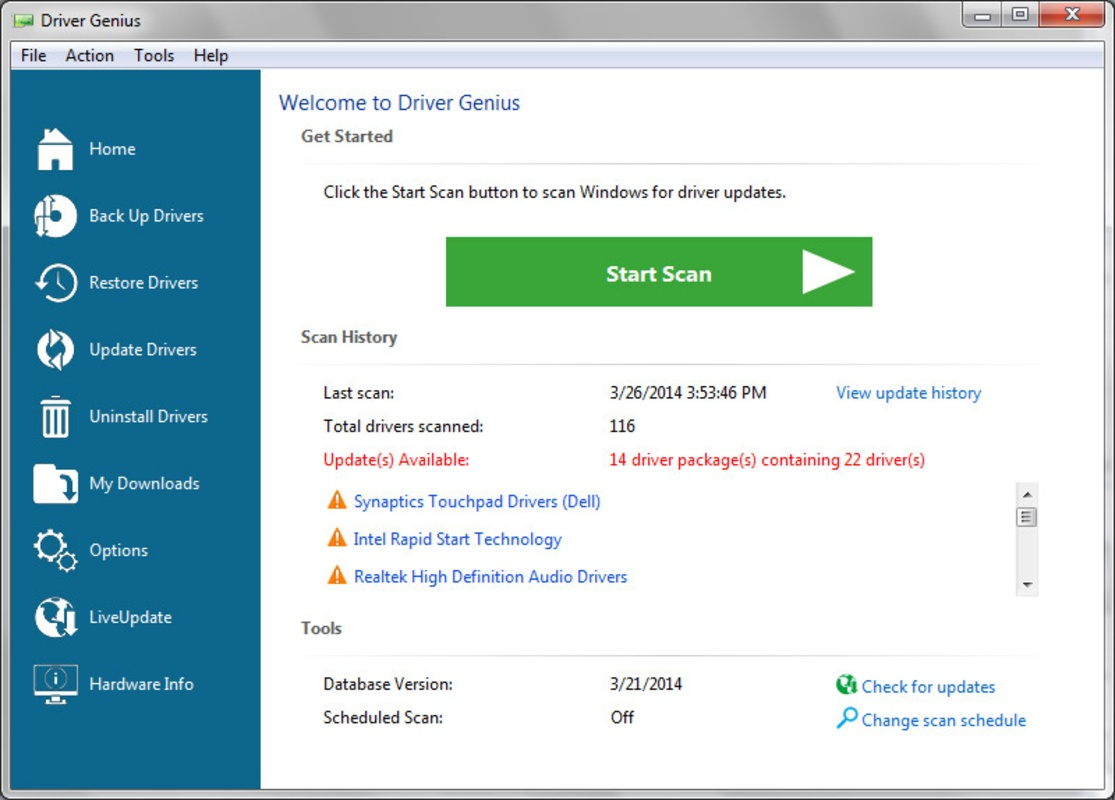
- Automatic Driver Updates: The program scans the system for outdated drivers and notifies users of available updates, including suggestions for improved versions.
- Driver Optimization: It identifies and installs drivers that enhance device performance, ensuring hardware operates at its full potential.
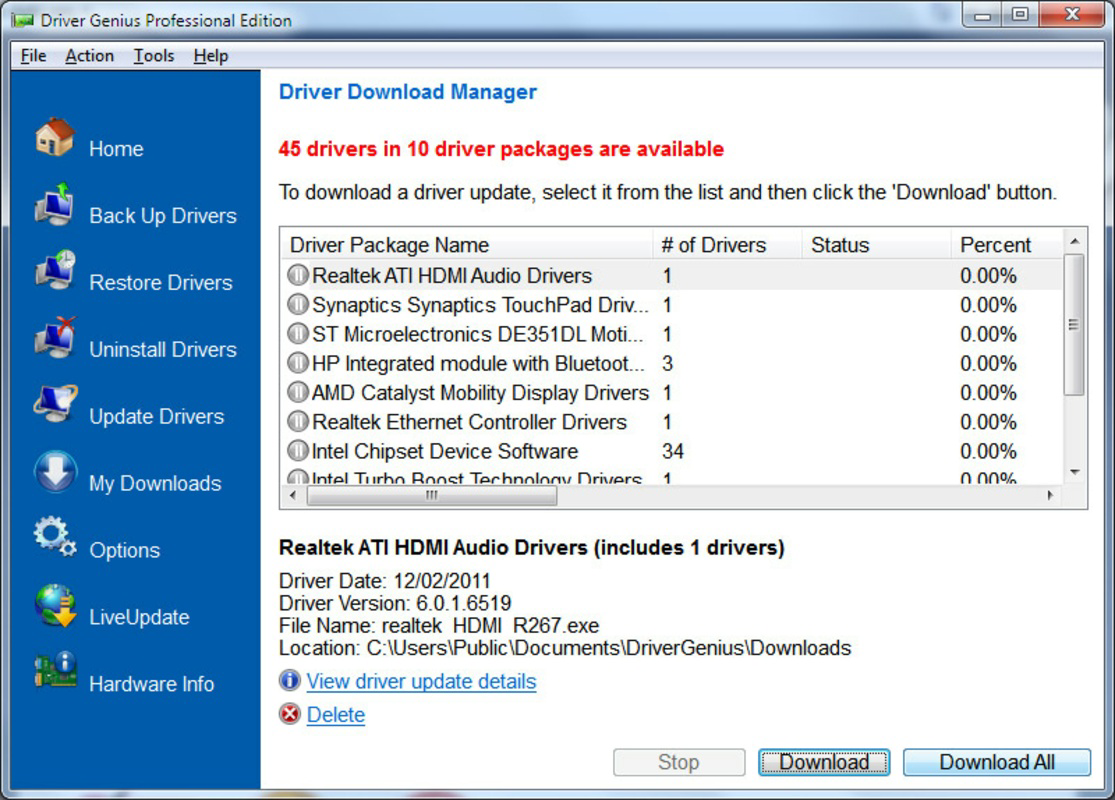
- Backup and Recovery: Users can create full backups of current drivers and restore them if new installations cause instability.
- Comprehensive Driver Management: The tool unifies updating, optimization, backup, and recovery into a single workflow, reducing system maintenance time.
For example, a user experiencing audio glitches can run a scan, identify the outdated sound card driver, and update it with one click. Similarly, before reinstalling Windows, a user can back up all drivers to preserve hardware functionality post-installation. These real-world applications highlight the app’s practical value in daily computing.
Interface, UX & Performance
The user interface of Driver Genius Professional is designed with clarity and efficiency in mind. It employs a modern, minimalist layout with well-organized sections, including a dashboard that displays driver status, update availability, and system health. Navigation is linear and consistent, with clearly labeled menus and actionable buttons that guide users through each process.
Although the developer did not list formal performance metrics, the application appears to operate smoothly on standard Windows systems. It does not consume excessive memory or CPU during scans, and updates are processed without disrupting ongoing tasks. Responsiveness is maintained across different device categories, including laptops and desktops, though specific device-level testing details were not disclosed.
Stability is a notable strength—users can expect consistent operation during long-running tasks like full system scans. The software integrates well with the Windows environment, avoiding conflicts with other system processes. However, compatibility with older Windows versions was not specified, so users should verify their OS version before installation.
Platform Compatibility & Technical Requirements
Driver Genius Professional is available exclusively for the Windows platform. The current version is 2.0.1, with a file size of 25.5 MB. This compact footprint suggests efficient resource usage and fast installation times. The application is designed to run on modern Windows operating systems, though the developer did not specify minimum OS requirements.
Given the app’s focus on driver management, it likely supports Windows 10 and Windows 11, which are the most widely used versions today. However, users with older systems such as Windows 7 or 8.1 should confirm compatibility through official channels. No additional hardware requirements were listed, indicating broad accessibility across standard desktop and laptop configurations.
Pros and Cons
Pros
- Intuitive interface suitable for users of all technical levels
- Automatic detection and update of outdated drivers
- Comprehensive backup and recovery functionality
- Centralized management for all device drivers
- Lightweight file size with efficient system integration
Cons
- Price point of $49.95 may be high for casual users
- Specific OS compatibility details were not disclosed
- No information on cloud-based backup or remote access features
- Updates may require manual confirmation for some driver types
- Limited third-party integration beyond standard Windows tools
FAQ
Is Driver Genius Professional safe to install?
Yes, the software is developed by Wondershare, a reputable company in the digital productivity space. It does not contain malware or intrusive ads, and it operates within standard Windows security protocols.
Can I use Driver Genius Professional on multiple devices?
The license terms were not specified in the provided information. Users should consult the official website or purchase agreement for details on multi-device usage.
Does the app require an internet connection?
Yes, an active internet connection is required for driver scans, update downloads, and cloud-based backup features (if available).
How often should I update my drivers using this tool?
It is recommended to run a scan at least once a month or after major system updates to maintain optimal performance and stability.
Is there a free version available?
The provided information does not mention a free version. The current offering is a paid tool with a price of $49.95.
Final Thoughts
Driver Genius Professional stands out as a robust, user-focused utility for managing device drivers on Windows. Its combination of automation, optimization, and recovery tools makes it a valuable asset for anyone seeking to maintain a stable, high-performing system. While the price may deter budget-conscious users, the tool’s comprehensive functionality justifies the investment for power users, IT professionals, and anyone dealing with hardware reliability issues.
For those who prioritize system integrity and performance, Driver Genius Professional offers a reliable, all-in-one solution. Its clean interface, efficient workflow, and strong backup capabilities make it a standout in the utilities category. Whether you're troubleshooting a malfunctioning device or preparing for a system refresh, this app delivers consistent value.
Download Driver Genius Professional now
Guides & Tutorials for Driver Genius Professional
How to install Driver Genius Professional
- Click the Preview / Download button above.
- Once redirected, accept the terms and click Install.
- Wait for the Driver Genius Professional download to finish on your device.
How to use Driver Genius Professional
This software is primarily used for its core features described above. Open the app after installation to explore its capabilities.
User Reviews for Driver Genius Professional 0
No reviews found


